
Webflow
Automate contextual links across Webflow CMS collections and static pages, guided by your Google Search Console keywords.
Internal linking for WebflowLinkerFlow is the AI internal linking tool that reads your content and Google Search Console data, then suggests the right contextual links for every page. You approve, we publish. Your rankings climb.






1000+ sites use LinkerFlow
Organic traffic
+127%
Internal links built
Why LinkerFlow?
Search engines rely on contextual internal links to understand your site structure, discover important pages, and distribute authority across your website. Without them, even strong pages stay isolated.
LinkerFlow scans your pages, CMS items, blog posts, and landing pages, maps the semantic relationships between them, and surfaces the contextual link opportunities you're missing, automatically.
Connect your site in minutes. Static pages and CMS content are analyzed together, so suggestions reflect the way your site is actually structured.
Every suggestion connects pages that genuinely belong together, with anchor text that fits naturally into your existing copy.
Review the source page, target page, anchor text, and context before anything is published on your site.
Manual internal linking is slow and tedious. We made it fast, accurate, and efficient.
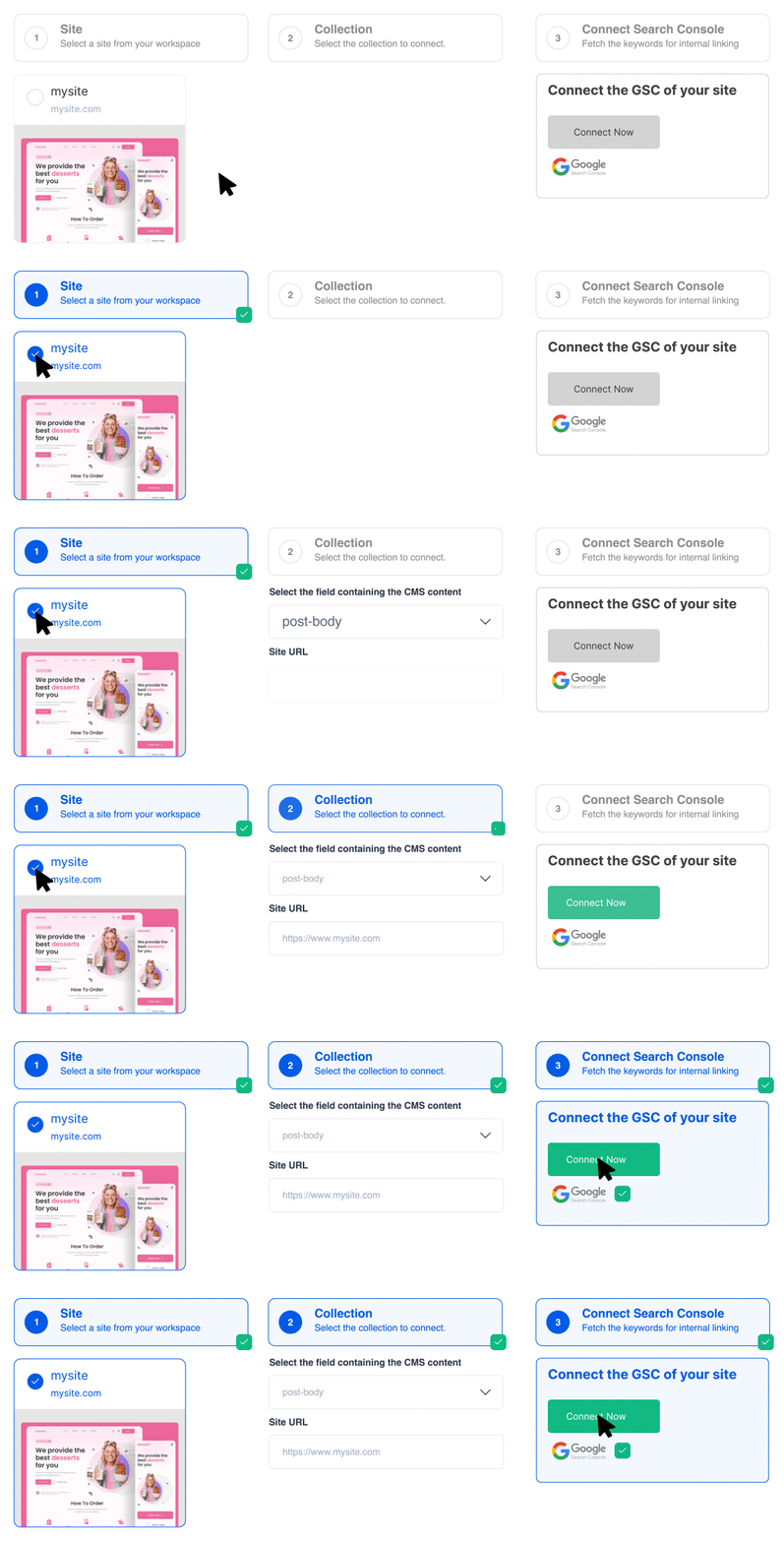
Connect your site in 2 minutes and link Google Search Console. LinkerFlow is then ready to work on autopilot.
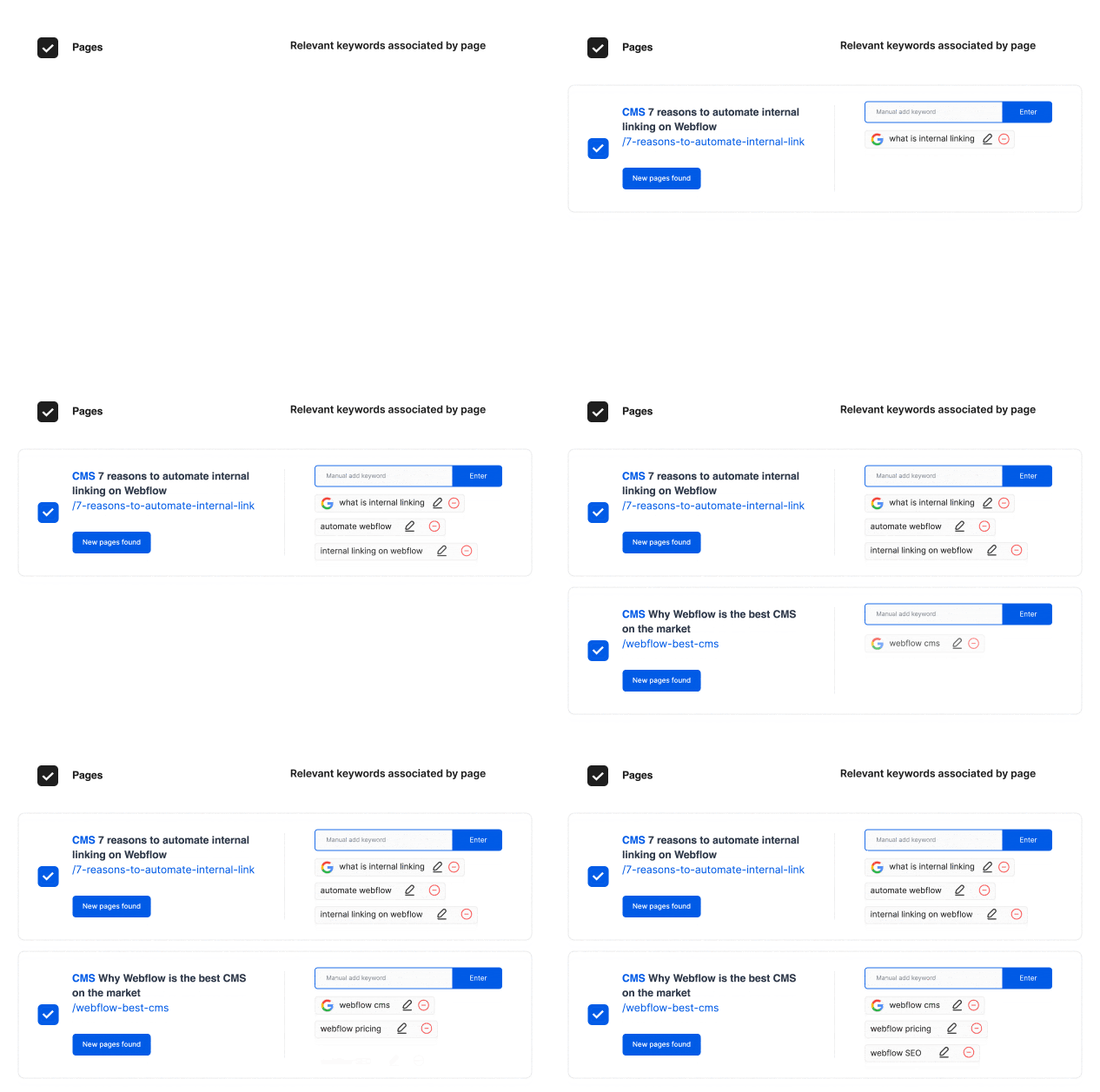
LinkerFlow analyzes your website and Google Search Console data to assign the right anchor keywords to every page of your site, making internal linking relevant.
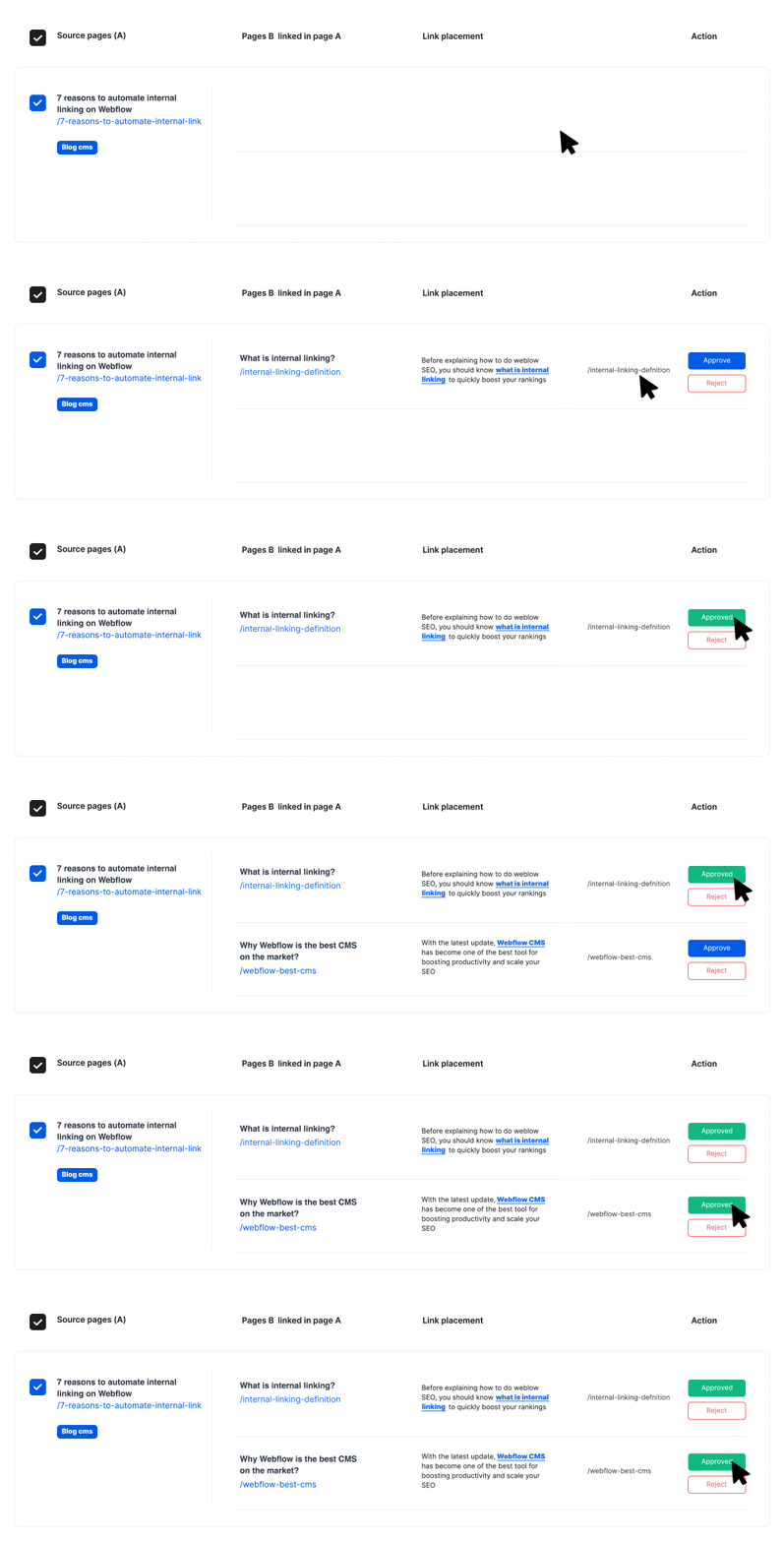
Review every suggestion made by our AI and approve or deny it. Approved links go live on your site automatically.
Platforms
LinkerFlow connects natively to the platforms below. Pick yours to see how it works.
Automate contextual links across Webflow CMS collections and static pages, guided by your Google Search Console keywords.
Internal linking for WebflowAdd contextual internal links to posts, pages and custom post types with the LinkerFlow WordPress plugin.
Internal linking for WordPressConnect your Wix site and publish relevant internal links across pages, blog posts and dynamic pages.
Internal linking for WixFramer support is in preparation. Join the waitlist to get early access.
Join the Framer waitlistPrefer a done-for-you service? See our internal linking services
But if you think otherwise, feel free to send us a message
Connect your website in just 2 minutes, let LinkerFlow crawl your site, and let AI suggest the best links for you!
LinkerFlow analyzes your website and creates contextual internal links pointing to both your static and CMS pages.
We track both Google Search Console and your website content to discover keywords. Our AI then suggests the best internal links based on these keywords, so all the links are relevant!
Internal linking is a key factor in optimizing your website's SEO, and LinkerFlow lets you do it in no time. By connecting relevant pages, you pass link equity ("link juice") between them, strengthening topical authority and improving PageRank distribution across your site.
LinkerFlow automatically crawls your website every 7 days to detect new link opportunities and check for broken links. All you have to do is approve them with a single click before they go live!
Automatically detect and manage broken links across your site. LinkerFlow crawls all your pages to identify 404 errors and broken internal or external links, then lets you fix them directly from your dashboard to maintain a healthy site and protect your SEO rankings.
Whether you're a business owner, content creator, or marketing professional: LinkerFlow is designed to be simple and powerful.
No coding skills required.
Run your business, not your SEO. LinkerFlow works automatically in the background, no technical knowledge needed.
Recommend LinkerFlow to your clients and boost their SEO effortlessly. One plan per website keeps things simple for every project you manage.
Deliver better SEO results for your clients or company without spending hours on manual linking tasks.
Scale your internal linking services effortlessly. Manage internal linking for multiple client sites from one simple dashboard.
No technical expertise required • Set up in 3 minutes • Works automatically
Verified reviews from teams automating their internal linking with LinkerFlow.
Recommended for anyone managing internal linking across client sites
“Genuinely impressed with what it catches in a single crawl: The Link Health scan surfaces real, verifiable issues in one pass, broken links, redirect chains, orphan pages, including some I'd missed doing this manually beforehand. Link Proposals are contextually sensible, not spammy. Natural anchor text, genuine topical relevance between source and target pages…”
David
Trustpilot review, Australia
Almost a year using LinkerFlow
“We've been using LinkerFlow for almost a year now to build internal links on Spylead, and the results have been fantastic. The team is super responsive whenever we have questions, and they've been shipping some really solid new features lately.”
Mike
Trustpilot review, United States
I made 212 internal links
“I made 212 internal links, that are super relevant, in 3 minutes. Still shocked by the relevancy, and how effective it is for the price”
Martin
Trustpilot review, France
5 out of 5 stars from 3 reviews on Trustpilot
Read all reviews on Trustpilot

GET 4 MONTHS FREE!


For single language websites
For localized websites
For agencies managing multiple websites
Free tools
Run a free internal link audit on any website and see what to fix first.
Find broken internal links and 404 errors across your website.
Check broken linksFind pages that no other page links to, so visitors and search engines can reach them again.
Find orphan pagesDetect pages without outgoing internal links that trap visitors and crawlers.
Find dead-end pagesSpot anchor texts that point to several pages and send mixed signals to search engines.
Check anchor text cannibalizationGuides
Practical guides to build a stronger site structure.
How many internal links per page, where to place them and which anchor text to use.
Read the internal linking guideThe main WordPress internal linking plugins compared on automation, relevance and price.
Compare WordPress pluginsWhy broken links hurt rankings and how to find and fix them.
Read the broken links guideAudit and fix broken links in one click to keep a balanced link strategy.
Learn how to fix broken links11 SEO tools compared for B2B marketing teams.
Compare B2B SEO toolsClear definitions of internal linking and technical SEO terms, from anchor text to crawl budget.
Browse the SEO glossaryAll you need to know about LinkerFlow and automatic internal linking.
Still have questions? Contact us anytime!

